

Scheme tokenisation
Store cards securely and process repeat payments using scheme-issued tokens.
Introduction
Scheme tokenisation lets customers save their cards securely for repeat purchases like one-click checkout, subscriptions, and in-app payments without re-entering their card details. It works by replacing customers’ card numbers with tokens issued by the card schemes and storing the tokens instead of the actual card numbers – your systems handle less sensitive cardholder data, lowering security risks and reducing PCI DSS scope.
Unlike Gateway tokenisation, where emerchantpay issues and manages the token, scheme tokens are issued directly by the card schemes. Scheme tokenisation is part of the EMVCo tokenisation framework, which card schemes implement through their own token services, such as Visa Token Service (VTS) and Mastercard Digital Enablement Service (MDES). These services provision scheme tokens and manage their lifecycle.
For general information about tokenisation and a comparison of gateway and scheme tokenisation, see Tokenisation. For complete request and response fields, examples, and error codes, see the Tokenisation API reference.

Prerequisites
Scheme tokenisation is currently supported only for Visa and Mastercard cards processed with emerchantpay acquiring. Support for other acquirers and additional card schemes will be added in the future.
Before you integrate scheme tokenisation:
- Contact emerchantpay support to enable the required tokenisation features.
- For a Web Payment Form (WPF) integration, make sure Supports WPF tokenization is enabled.
- For a Server-to-server integration, make sure your card-capture environment meets the applicable PCI DSS requirements. You must also meet the applicable PCI DSS and approval requirements before you can Detokenize tokens to retrieve unmasked card data.
- Client-side encryption can reduce the amount of raw card data handled by your server, but you remain responsible for validating the PCI DSS scope of your implementation.
- Scheme tokenisation is supported for applicable card transactions that accept cardholder data, but not for payouts.
To verify that WPF tokenisation is enabled for your account:
- Log in to your Gateway Console.
- In the Configuration > Merchants menu, select your account.
- In the Supported features row, locate the Supports WPF tokenization entry.
Server-to-server integration
With a Server-to-server integration, you can use either of the following scheme tokenisation workflows. You can run both workflows in parallel.
- Managed scheme token workflow – You store and submit an emerchantpay gateway token in transaction requests. emerchantpay maps the gateway token to the linked scheme token, automatically requests the required token cryptograms from the card scheme and manages token lifecycle events behind the scenes. This workflow requires less integration effort because emerchantpay manages the scheme token operations.
- Direct scheme token workflow – You submit a scheme token (DPAN) directly as
card_numberwithscheme_tokenizedset totrue. You can obtain the scheme token through emerchantpay’s Tokenisation API or an external tokenisation provider. For customer-initiated transactions (CITs), you must also supply the required tokenisation cryptogram, obtained from emerchantpay’s Cryptogram service or your external provider. This workflow provides greater control but requires you to manage the scheme token data and the applicable transaction parameters.
To compare the workflows:
| ASPECT | MANAGED SCHEME TOKEN WORKFLOW | DIRECT SCHEME TOKEN WORKFLOW |
|---|---|---|
| Token passed in transaction requests | Gateway token | Scheme token |
| Who manages the scheme token | emerchantpay | You or your external tokenisation provider |
| Visibility of the scheme token | emerchantpay stores and manages the scheme token | You receive and store the scheme token |
| Token provisioning | emerchantpay provisions the scheme token automatically | emerchantpay Tokenisation API or an external tokenisation provider |
| Cryptogram generation | emerchantpay automatically requests the required token cryptogram from the card scheme | You request the cryptogram through emerchantpay’s Cryptogram service or obtain it from your external provider |
| Token lifecycle management | emerchantpay manages token updates and lifecycle events | You or your external provider manage token updates and lifecycle events |
| Control over scheme tokenisation | emerchantpay manages scheme token operations | You are responsible for maintaining the scheme token, its expiry and any updates received from the tokenisation provider |
Both workflows support Customer-Initiated Transactions (CITs) and Merchant-Initiated Transactions (MITs) – requests to the Transactions API. The difference is the following:
- CITs are payments your customer actively initiates, such as completing a purchase at checkout or adding funds to an account.
- MITs are payments that you initiate later under a customer’s previous authorisation, such as a subscription renewal. Supported MIT types include:
- Merchant unscheduled: you charge the customer later at an unscheduled time, such as for usage-based or delayed charges.
- Non-referenced recurring: you charge the customer on a recurring schedule without referencing a previous transaction, such as for subscriptions.
- Referenced recurring: you charge the customer on a recurring schedule and reference the original transaction so that emerchantpay can derive the required credential and linking information.
When you use emerchantpay’s tokenisation services, each saved card is associated with a consumer. Consumer management depends on the API you use:
- Tokenisation API – An enabled consumer must already exist before you call the standalone Tokenize service. You can create and manage consumers through the Consumers API.
- Transactions API – emerchantpay handles consumer creation and token association automatically during payment processing. When tokenising a card for a new consumer, include
customer_email, the card details, andremember_cardset totrue. You do not need to create the consumer separately through the Consumers API. The transaction response and notification return theconsumer_idand token.
If the consumer already exists, include the matching consumer_id and customer_email in the transaction request. Store the returned identifiers for subsequent transactions.
For Tokenisation API and Transactions API requests that use an existing emerchantpay consumer, submit the matching consumer_id and email address.
emailin Tokenisation API requestscustomer_emailin Transactions API requests
Managed scheme token workflow
Use this workflow if you want emerchantpay to handle the scheme token mechanics for you. You only store the value of the gateway token and send it in later transactions. Behind the scenes, emerchantpay maps it to the linked scheme token and obtains the required cryptogram automatically for CITs.
1. Tokenise the card
You can create a scheme-backed emerchantpay gateway token before the payment or while processing the first payment.
Tokenise before the payment
An enabled consumer must already exist. Use the Tokenize service and include:
emailconsumer_idscheme_tokenizedset totruetoken_typeset touuidcard_data:card_numberexpiration_monthexpiration_yearcard_holder, if available
Store the token value immediately when it is returned in the response. This is the emerchantpay gateway token to submit in later CITs and MITs. The Tokenisation API does not provide a way to retrieve the plain-text token value later. Tokenising the same card details again creates a new token.
CVV requirements for customer-initiated transactions (CITs) depend on the card scheme and transaction type:
- Visa – CVV is not required for CITs that use 3D Secure, a scheme token, or previously stored credentials with
credential_on_fileset tosubsequent_customer_initiated. - Mastercard – Similar CVV exceptions generally apply. However, online gambling transactions require CVV unless 3D Secure is used. This requirement applies whether the transaction uses a scheme token (DPAN) or the original card number (FPAN).
These requirements concern payment processing, not standalone Tokenize requests. The standalone Tokenize service does not accept CVV. For payment transactions, additional requirements may apply depending on your terminal configuration. Confirm any merchant-specific requirements with your emerchantpay Account Manager.
Tokenise during the first payment
Send the card details in the transaction request and set:
remember_cardtotruescheme_tokenizedtotruecvvis generally optional, especially if you use 3D Secure; however, it can be required in specific cases – discuss this with your emerchantpay Account Manager.
When the transaction is processed, the response or notification returns:
consumer_id– the consumer associated with thecustomer_emailtoken– the emerchantpay gateway token for the saved card
Store both values as soon as you receive them and associate them with the customer_email submitted in the transaction request. Submit the same consumer_id, customer_email, and token in later CITs and MITs.
2. Store and present saved payment methods
For each saved card, store a separate record containing:
- your customer reference
customer_emailconsumer_idtoken- masked card number
You can also retain non-sensitive display information, such as the card brand and expiry month and year.
The following is an example managed-workflow saved card mapping:
| CUSTOMER |
customer_email |
consumer_id |
token |
MASKED CARD NUMBER |
|---|---|---|---|---|
| John Smith | jsmith@example.com | 123456 | ee946db8-d7db-4bb7-b608-b65b153e127d | 464000…0794 |
| John Smith | jsmith@example.com | 123456 | 2bb4c5cd-2868-4c33-80b9-256cfbc549fe | 537420…7232 |
| Jennifer Morrison | jenniferm@example.com | 456123 | 10f587e9-ad05-4a79-9c4c-6d2b79bad941 | 543590…8123 |
Use the Get card service to retrieve the masked card number and other non-sensitive display information associated with a token. You can also obtain the masked card number by reconciling the payment associated with the token.
For a scheme-backed token, the Get card service returns the masked DPAN (scheme token), not the customer’s physical card number (FPAN). The last four digits, card brand and expiry date correspond to the DPAN. The last four digits may therefore differ from those printed on the customer’s physical card.
The same applies to cards retrieved through get_consumer_cards and displayed in the WPF saved-card list. Use the returned details to display the saved payment method, but do not assume that they match the physical card details.
Display only non-sensitive information, such as the card brand and last four digits, when asking the customer to choose a saved card. When the customer selects a card, submit the corresponding token together with the matching consumer_id and customer_email.
A consumer can have multiple tokens. When you tokenise another card for the same consumer, emerchantpay issues a separate gateway token for that card. Keep each token as a separate saved card.
3. Process customer-initiated transactions
Include the following in your CIT request:
customer_email– optional; If you include it, use theconsumer_idassociated with the saved token.consumer_id- set
tokento the emerchantpay gateway token value from step 1 - set
scheme_tokenizedtotrueto use scheme tokenisation - set
credential_on_fileto:initial_customer_initiatedfor the first CIT in a seriessubsequent_customer_initiatedfor later CITs in a series
Important: For subsequent Visa CITs, set
credential_on_filetosubsequent_customer_initiated. This identifies the payment as a transaction using previously stored card credentials and helps ensure that the issuer receives the correct transaction information for authorisation.
emerchantpay will automatically use the linked scheme token and include a cryptogram for the CIT.
4. Process merchant-initiated transactions
Include the following in your MIT request:
customer_emailconsumer_id- gateway
tokenfrom step 1 scheme_tokenizedset totrue
Also, link to the original CIT using the fields below:
- Merchant unscheduled:
credential_on_file– set tomerchant_unscheduledcredential_on_file_transaction_identifier– set to the original transaction’sscheme_transaction_identifier.credential_on_file_settlement_date– for Mastercard transactions, set to the original transaction’sscheme_settlement_date. This parameter is not required for Visa transactions.
- Non-referenced recurring:
recurring_type– set tosubsequentcredential_on_file_transaction_identifier– set to the original transaction’sscheme_transaction_identifier.credential_on_file_settlement_date– for Mastercard transactions, set to the original transaction’sscheme_settlement_date. This parameter is not required for Visa transactions.
- Referenced recurring: include the correct reference identifier as linking data.
recurring_type– set tosubsequentreference_id– set to the original transaction’sunique_id.
Direct scheme token workflow
This workflow uses the scheme token (DPAN) directly in transaction requests instead of the original card number (FPAN).
The following token provisioning and cryptogram request steps describe the integration with emerchantpay’s Tokenisation API.
If you use an external tokenisation provider, obtain the scheme token, its expiry and the required transaction cryptogram from that provider instead. You do not need to use emerchantpay’s Tokenise or Cryptogram services for externally provisioned tokens.
When processing a transaction with an externally provisioned scheme token, submit the DPAN as card_number, set scheme_tokenized to true, and include the applicable tokenisation parameters. For CITs, include the cryptogram in tokenization_params.tavv and set credential_on_file to initial_customer_initiated or subsequent_customer_initiated, as applicable.
An emerchantpay gateway token and consumer association are not required solely to submit an externally provisioned DPAN directly in a transaction request.
1. Tokenise the card
Use the Tokenize service and include:
emailconsumer_idscheme_tokenizedset totruetoken_typeset touuidcard_data:card_numberexpiration_monthexpiration_yearcard_holder, if available
The response returns token, which is the emerchantpay gateway token, and, when scheme tokenisation succeeds, scheme_token.
Store token immediately because its plain-text value cannot be retrieved later. The values to store for each saved payment method are described in the following section.
Tip: You can also tokenise the card while processing the first payment by setting both remember_card and scheme_tokenized to true in the transaction request.
2. Store and present saved payment methods
For each saved card, store a separate record containing:
- your customer reference
customer_emailconsumer_idtoken– the emerchantpay gateway token required for Cryptogram service requestsscheme_token– the card-scheme token submitted ascard_numberin direct transactionsexpiration_monthandexpiration_yearfor the scheme token (returned in step 3 – request a cryptogram)- masked card number
You can also retain non-sensitive display information, such as the card brand.
The following is an example direct-workflow saved card mapping:
| CUSTOMER |
customer_email |
consumer_id |
token |
scheme_token |
SCHEME TOKEN EXPIRY | MASKED CARD NUMBER |
|---|---|---|---|---|---|---|
| John Smith | jsmith@example.com | 123456 | ee946db8-d7db-4bb7-b608-b65b153e127d | 464000…0794 | 02/2028 | 464000…0794 |
| John Smith | jsmith@example.com | 123456 | 2bb4c5cd-2868-4c33-80b9-256cfbc549fe | 537420…7232 | 06/2029 | 537420…7232 |
| Jennifer Morrison | jenniferm@example.com | 456123 | 10f587e9-ad05-4a79-9c4c-6d2b79bad941 | 543590…8123 | 12/2028 | 543590…8123 |
The scheme_token values are masked in this example. Store the complete scheme_token value returned by the API.
A scheme_token has the same numeric format as a payment card number and cannot be distinguished from an original card number by its pattern. Track it through your stored metadata and submit it as card_number only when scheme_tokenized is set to true.
Use the Get card service with the matching consumer_id, email, token, and token_type to retrieve the masked card details used for display. The Get card response does not return the scheme token, so retain scheme_token and its expiry in your own saved-payment-method record.
When an emerchantpay gateway token is linked to a scheme token, the Get card service returns the masked DPAN (scheme token), not the customer’s physical card number (FPAN). The last four digits, card brand and expiry date correspond to the DPAN. The last four digits may therefore differ from those printed on the customer’s physical card.
The same applies to cards retrieved through get_consumer_cards and displayed in the WPF saved-card list. Use the returned details to display the saved payment method, but do not assume that they match the physical card details.
When a Cryptogram service response returns a scheme_token or expiry value that differs from the values you previously stored, update the saved-payment-method record and use the latest returned values.
Do not treat cryptogram or eci as reusable saved-payment-method values. Request a new cryptogram for each customer-initiated transaction and use it only for the transaction for which it was requested.
3. Request a cryptogram (for CITs only)
To process a transaction using a scheme token instead of the original card number, the card scheme expects a cryptogram as proof that the token is legitimate. The cryptogram serves several purposes:
- authenticates the scheme token to the card scheme
- links the token to a specific transaction
- prevents replay attacks because the value is generated dynamically
- allows issuers to validate the tokenised transaction
Request a cryptogram for each CIT that you process directly with a scheme token. MITs normally do not require a cryptogram.
Exception: Visa requires a token cryptogram for zero-amount account-verification messages, even when the message is treated as an MIT.
Use the cryptogram for the CIT for which you requested it. Request a new cryptogram for each later CIT rather than treating the cryptogram as a reusable saved-payment-method value.
Use the Cryptogram service to request a cryptogram, and include:
email– use the same values that were used when provisioning the tokenconsumer_idtoken– the emerchantpay gateway token’s value, returned during provisioning.token_typeset touuidscheme_tokenizedset totruetransaction_reference– your unique reference for the cryptogram request
The response includes:
cryptogram– the token cryptogram valuescheme– the scheme associated with the tokenscheme_token– the scheme token valueexpiration_monthandexpiration_year– the scheme token’s expiryeci– an Electronic Commerce Indicator (ECI) returned for Visa only; Mastercard doesn’t return an ECI.token– the emerchantpay gateway tokentoken_id– a reference identifier; not to be used as the token value
4. Process customer-initiated transactions
Include the following in your CIT request:
customer_emailconsumer_id– not required for associating externally provisioned scheme tokens with an emerchantpay consumer- set
card_numberto thescheme_tokenvalue - set
expiration_monthandexpiration_yearto the token expiry you received in the previous step - set
scheme_tokenizedtotrueto treat thecard_numberas a scheme token - include
tokenization_params– the tokenisation outcome data:tavvset to thecryptogramvalue from the previous stepecifrom the previous step if the card scheme is Visa; see the code values.
mpi_params– the 3D Secure authentication outcome data- Applicable only if you use your own 3D Secure server / Merchant Plug-In (MPI); skip for emerchantpay 3D Secure or no-3D Secure flows.
- set
credential_on_fileto:initial_customer_initiatedfor the first CIT in a seriessubsequent_customer_initiatedfor later CITs in a series
Important: For subsequent Visa CITs, this ensures that emerchantpay will send POS entry mode 10 (stored credential). If you omit
credential_on_fileset tosubsequent_customer_initiated, POS entry mode 01 (manual entry) is sent, which can affect issuer authorisation decisions.
5. Process merchant-initiated transactions
Include the following in your MIT request:
customer_emailconsumer_id- set
card_numberto thescheme_tokenvalue - set
expiration_monthandexpiration_yearto the scheme token expiry - set
scheme_tokenizedtotruein order to treat thecard_numberas a scheme token
Also, link to the original CIT:
- Merchant unscheduled:
credential_on_file– set tomerchant_unscheduledcredential_on_file_transaction_identifier– set to the original transaction’sscheme_transaction_identifier.credential_on_file_settlement_date– for Mastercard transactions, set to the original transaction’sscheme_settlement_date. This parameter is not required for Visa transactions.
- Non-referenced recurring:
recurring_type– set tosubsequentcredential_on_file_transaction_identifier– set to the original transaction’sscheme_transaction_identifier.credential_on_file_settlement_date– for Mastercard transactions, set to the original transaction’sscheme_settlement_date. This parameter is not required for Visa transactions.
- Referenced recurring: include the correct reference identifier as linking data.
recurring_type– set tosubsequentreference_id– set to the original transaction’sunique_id.
Web Payment Form integration
With the Web Payment Form (WPF), emerchantpay hosts the checkout page and captures card data on its own PCI DSS-compliant infrastructure. When a customer enters their card payment details, they can select Save card to save their card for future use.
Each saved card is associated with a consumer, identified by consumer_id and customer_email. When the customer already has a consumer profile, submit the matching consumer_id and customer_email in the WPF Create request. Do not rely on customer_email alone to identify an existing consumer.
When the customer does not already have a consumer profile, submit customer_email without consumer_id. emerchantpay creates the consumer and returns consumer_id in the WPF response and notification.
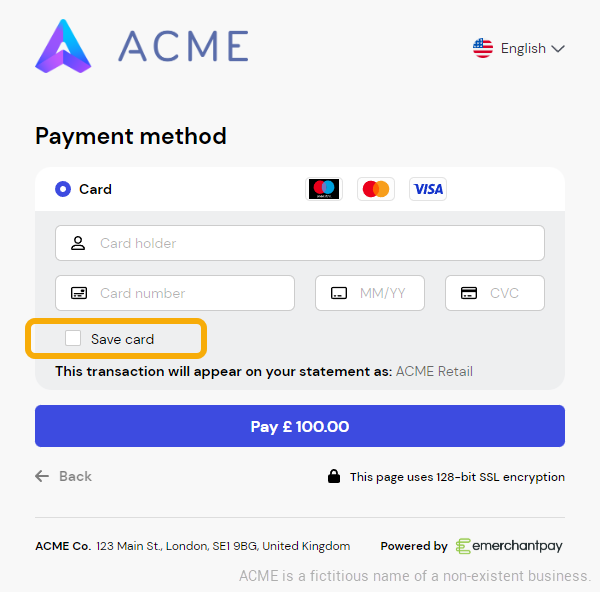
1. Tokenise the card
To enable scheme tokenisation in a WPF flow, include the following in your initial WPF Create request:
remember_cardset totruescheme_tokenizedset totruecustomer_emailconsumer_idwhen the customer already has a consumer profile.- use a 3D Secure transaction type, such as
authorize3dorsale3dfor the first CIT in a recurring series.
When the payment is approved and scheme tokenisation succeeds, emerchantpay creates the saved card/token entry for the consumer. You don’t need to request or submit a cryptogram in the WPF flow because emerchantpay manages these operations behind the scenes.
If scheme tokenisation fails and the payment falls back to FPAN processing, no token is returned in the WPF response or notification.
2. Store and present saved payment methods
At minimum, store the consumer_id returned in the WPF response or notification with the customer_email submitted in the WPF Create request.
The following is an example WPF consumer mapping:
| CUSTOMER |
customer_email |
consumer_id |
|---|---|---|
| John Smith | jsmith@example.com | 123456 |
| Jennifer Morrison | jenniferm@example.com | 456123 |
When the customer selects Save card and the card is saved successfully, the WPF notification also returns payment_transaction_token. This is the emerchantpay gateway token associated with the saved card.
You do not normally need to store an individual token when all later customer-initiated payments are processed through the WPF.
Store payment_transaction_token when you need to:
- use that specific saved card in a server-to-server transaction
- request or manage the specific token through the Tokenisation API
- delete a specific saved card
- maintain your own card-level record of the customer’s saved payment methods
If you maintain your own card-level records, store each saved card separately. The following is an example:
| CUSTOMER |
customer_email |
consumer_id |
payment_transaction_token |
MASKED CARD NUMBER |
|---|---|---|---|---|
| John Smith | jsmith@example.com | 123456 | ee946db8-d7db-4bb7-b608-b65b153e127d | 464000…0794 |
| John Smith | jsmith@example.com | 123456 | 2bb4c5cd-2868-4c33-80b9-256cfbc549fe | 537420…7232 |
| Jennifer Morrison | jenniferm@example.com | 456123 | 10f587e9-ad05-4a79-9c4c-6d2b79bad941 | 543590…8123 |
When you use payment_transaction_token in a Tokenisation API request, submit its value as token and set token_type to uuid.
Use the Get card service to retrieve the masked card number and other display information associated with a payment_transaction_token. Display only information such as the card brand and last four digits when presenting a saved card to the customer.
For a scheme-backed token, the Get card service returns the masked DPAN (scheme token), not the customer’s physical card number (FPAN). The last four digits, card brand and expiry date correspond to the DPAN. The last four digits may therefore differ from those printed on the customer’s physical card.
The same applies to cards retrieved through get_consumer_cards and displayed in the WPF saved-card list. Use the returned details to display the saved payment method, but do not assume that they match the physical card details.
You do not need to store scheme_token, scheme-token expiry, or cryptograms for WPF payments. emerchantpay manages the scheme-token operations behind the scenes.
3. Process payments with saved cards
When a returning customer wants to pay using a previously saved card, include the following in the WPF Create request:
remember_cardset totruescheme_tokenizedset totruecustomer_emailconsumer_id- the fields required by the selected transaction and 3D Secure flow
The WPF uses the matching consumer_id and customer_email to retrieve and display the cards saved for the consumer. You do not normally need to submit payment_transaction_token.
The customer can select a saved card or choose another payment method. When a saved card is selected, the WPF prefills the saved card details. The customer enters the CVV when required and completes 3D Secure when applicable.
For follow-up customer-initiated or merchant-initiated transactions processed outside the WPF, use the relevant managed server-to-server or direct server-to-server instructions, including the applicable credential-on-file and transaction-linking fields.
Frequently asked questions
What format are token values returned in?
When you save a token for future payments, store the gateway token value together with the corresponding consumer_id and customer_email. Gateway tokens use token_type set to uuid and are returned as 36-character UUID values, for example ee946db8-d7db-4bb7-b608-b65b153e127d.
If you use the direct scheme token workflow, also store the scheme_token value returned by the API. The scheme_token is the tokenised version of the PAN, also called a DPAN, and is returned as a numeric value with the same length range as a payment card number: 13 to 19 digits.
Do not assume that a gateway token and a scheme token have the same format. Use the gateway token in the token field where the API expects a token value, and use the scheme_token as the card_number value only in direct scheme token transactions where scheme_tokenized is set to true.
How do I remove a saved card?
If a saved card is no longer needed, for example when a customer removes their card or a subscription ends, use the Delete Token service to invalidate the associated emerchantpay gateway token.
In the Delete Token request, include the matching consumer_id, email, token and token_type values. emerchantpay de-registers the scheme token from the card network only when you set scheme_tokenized to true.
After deleting the token, remove the saved payment method from your own records and do not use the invalidated gateway token in future payment requests.
How do I validate a token?
Use the Validate token service to check whether a gateway token is active. Submit the associated consumer_id, email, token and token_type.
A successful validation response includes status, token_id and token_type. Handle unsuccessful requests according to the Tokenisation API error codes.
Does using a scheme token and cryptogram meet the SCA requirements of the Revised Payment Services Directive (PSD2) framework?
No. A cryptogram proves that the scheme token is valid, but it doesn’t authenticate your customer. To meet SCA requirements, you typically still need 3D Secure (3DS).
SCA exemptions like Transaction Risk Analysis (TRA) may be applied to low-risk CITs, provided there is issuer support and adequate risk management in place.
For recurring payments, run 3DS on the first CIT and do not apply exemptions to meet SCA requirements. You can either:
- tokenise first, then run 3DS and process the first payment using a scheme token and cryptogram, or
- run the first payment using the card number and 3DS, then tokenise afterwards
Later MITs that are linked to the initial authenticated payment don’t need SCA.
For non-recurring payments with stored cards, it’s best to use 3DS on the first payment. For subsequent CITs, you can:
- skip 3DS and flag a TRA exemption (if eligible)
- run 3DS and flag a TRA exemption
- run 3DS with no exemption
Does scheme tokenisation shift liability to the issuer?
No. Scheme tokenisation improves security and can help reduce fraud-related chargebacks, but it doesn’t create a liability shift like 3D Secure (3DS). It also won’t prevent non-fraud disputes. For the best chargeback protection, use 3DS and scheme tokenisation.
Will adopting scheme tokenisation alleviate PCI DSS compliance requirements?
While scheme tokenisation lowers the PCI DSS scope, it doesn’t eliminate it completely. By using scheme tokens instead of storing or transmitting the card number, your environment handles less sensitive cardholder data, which can mean fewer systems in scope, a simpler SAQ/audit process, and lower risk exposure.
However, PCI DSS still applies anywhere you capture, process, store, or transmit card data before tokenisation, such as at initial card capture. You must also validate that tokenisation is implemented correctly, and if you handle scheme tokens, cryptograms, or ever fall back to card numbers, some PCI controls will still apply.
Can I use an external scheme tokenisation provider and still process scheme tokens with emerchantpay?
Yes, you can process payments using scheme tokens from a third-party tokenisation provider.
How do I convert an existing gateway token to a scheme-backed token?
Use the Retokenize service with the existing consumer_id, email, gateway token, and token_type. The gateway token value remains unchanged, but the token_id is updated and the response returns a scheme_token.
Test card data
Use the following test card details in the staging environment.
When provisioning a scheme token using the test cards listed below, provide CVV 000. This is a staging-only requirement imposed by the tokenisation provider and does not apply to production token provisioning.
In production, CVV is optional when provisioning a scheme token, although specific transaction types and card-scheme rules may require it during payment processing. See the CVV requirements described in the integration workflows above.
Visa
- 4111111145551142
- 4293189100000008
- 4166676667666746
- 4646464646464644
- 4000060000000006
Mastercard
- 5555341244441115
- 5577000055770004
- 5555555555554444
- 2222400050000009
- 2222400030000004